TechTogether

  • TechTogether
    • Get in touch
  • What Do We Do?
  • Websites
  • The Latest...
 

Domains, Hosting and Your Website

9/27/2012

1 Comment

 
Picture
When you have a website, you want people to be able to find you. In order for people to find you, you need to have a name for your site that people can remember and use with ease. When choosing your domain name, you want to keep everything simple so that you can be found easily. And usually, should your budget allow, you want to grab as many domain names as possible. For example, if you are registering greencharity.org, you may also want to try to get greencharity.ca and greencharity.com. This way, when someone types in "greencharity.com" they will be routed to your site. You still only have one website but it gives people a wider array of options to find you. 


The domain extension you use will also give information relative to who you are. Using popular domain names like .info or .com won't give any extra information about your organization. However, using a .ca or .org will let people know that you are Canadian or non-profit respectively. This can help to separate you from other entities. If people are looking specifically for the Canadian site, they may be more likely to try a .ca domain than they would be to try out a .com which could be anywhere. As well, the .ca domain names are registered by CIRA (Canadian Internet Registration Authority) who keep tight reigns on who can actually register for a .ca domain extension. 

Picture
Everybody wants to be on top, be it coming first in a race or becoming the boss of the office. This is also true of domain names, you want your name to be on top. You want your domain name to be a top level domain name. What's a top level domain name? It's the root name of any site. For example, a top level domain would be www.google.com. A site like mail.google.com is called a sub domain as it is an extension of the top level www.google.com. Being a top domain name is important as if someone forgets the rest of the address, they can be routed to where ever that top level domain is. If it isn't you, they may have a very hard time finding you. Sub domains are fine, but not for your main domain name. 


Picture
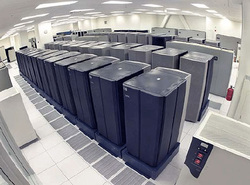
The next important thing to take in is the host. Your website will live on your host's servers so that they're accessible to the public. You choice of host matters for a lot of reasons. First, you want a host that provides good customer service. If you can't get a hold of them easily or it takes a week to get a response, if something goes wrong you will be in a really bad spot. Another important factor is the physical location of their servers. If their servers are located in Indonesia and most of your audience are in North America, the signal is going to take time to travel, resulting in a slower website. You want servers close to your audience or the internet backbone to ensure decent speed. 

Picture
The host's servers are a big factor. If their servers aren't maintained or they don't have backup systems in place, you can lose a lot of traffic from downed servers. Since your files are stored on these servers, if they go down it can take time to get them back up if the files are lost and they do not backup their servers (you should still back up all your own data regardless of your host). Your host can also limit how much space you have for storage, how many email addresses can be created, what types of coding can be used and what content management systems they have installed. Another big factor, especially for those of us in the non-profit sector, is the cost. The cost for service can vary wildly but since most service can be purchased online. You have a lot of options. You can find affordable, reliable web hosting and help registering your domain names with GreenIT. 

Picture
Content management systems (CMS) are systems that allow the average person to build more complicated, beautiful web sites easily. There are a number of different ones and they can vary drastically as to how effective they are. Drupal, Joomla and Wordpress are some of the more common systems. Typically, your host will have the systems on their server which you then install and within minutes you are ready to go. The CMS isn't installed on your computer, it lives with your site on the hosting server. So where ever you access your site, it will be there. Some, like Weebly, allow you to build your page simply by dragging and dropping content on to the page. Others you will need to do a bit more work to get the work you want but it is still a simple process.


Picture
Wordpress has been around for a while now. It has its roots as a blogging platform (it is the most popular blogging system today) but has expanded into a true content management system. According to Wikipedia.org, it is used for approximately 22% of new websites today. And there's good reason for this: It's a great program with a great support community. It is very powerful and easy to use, especially with the given plug ins and widgets. You can get your site up and running quickly using themes and plug ins, but you aren't locked to the exact theme you chose. You have full control over the HTML coding and Cascading Style Sheets (CSS) which enable you to get the look you want. Manipulating the HTML and CSS code can be difficult and complicated, but there are many different themes that should provide you with the look you want without having to touch the code. 


An important thing to note is that WordPress is open source. What open source means is that anyone can modify and work with the program (meaning you have a lot of people out there who can help improve the program and create new add-ons, like themes and plug ins, easily). Better yet, the fact that it is open source means that it is free. Using WordPress won't cost a cent in and of itself. With its ease of use and low cost, WordPress is a solution that should not be missed. More and more professional web developers are switching to one form of content management system or another and the numbers are increasing. With a better finished product, easier set up and easier updates, WordPress can help your site go to the next level. 
1 Comment

Windows 8

9/26/2012

0 Comments

 
 You may have heard the whisperings that Microsoft is coming out with its latest installment of the Windows operating system, Windows 8 later this year. This release marks the biggest redesign to Windows since the 95 platform released. There have been numerous updates, tweaks and changes to the system and not all of these changes are going to be easy to deal with. But, with more and more new systems going to touch screen, these changes could prove useful and beneficial. If you are stuck on your mouse (as most of us are), these changes could prove aggravating at first.

Picture
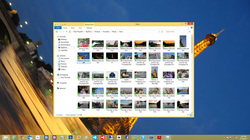
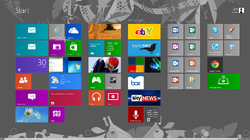
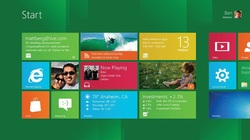
The biggest change by far is the new user interface (UI). Windows 8 still has a desktop that we're familiar with but it also introduces a Modern UI (commonly referred to as "Metro") using large buttons designed to make life easier. They can make navigation cumbersome but once you've adjusted, it also has the potential to make things easier for you. Having your favourite applications at your finger tips can be a great feature. However, many operations with the new interface mean dealing with apps. Microsoft is the latest getting in on apps. It really won't change a lot aside from now getting a lot of things through the new Microsoft store (some will be paid apps, others will be free, similar to the Apple App store which many of us are now used to) but prepare for a learning curve. If you have a late generation Apple mobile device (iPod Touch, iPhone, iPad), you will be more comfortable with this new way of navigating. 

Picture
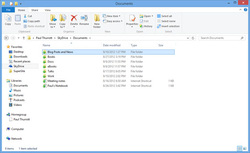
Another big change is to the desktop. Gone is the staple Start Menu but you can use the file browser along with the strong search features to find what you're looking for quickly (this will be at least somewhat familiar to current Windows 7 users). You can still start programs by clicking on icons just like you can on your current desktop. One of the new features which adds some nice flare to your desktop is Windows 8 will match colour schemes on your desktop with your selected backgrounds. It also allows more customization of your desktop, particularly for those running multiple monitor set ups which are becoming more common place as more and more tasks continue to be computerized.


Picture
  When you are looking over files in the browser, there is a new menu interface known as the Ribbon. If you have used current generation MS Office products, you will be familiar with the Ribbon. If you haven't, the Ribbon is a horizontal menu bar instead of the usual vertical drop menu. It has buttons for your various options that you can select with a click. This can also be collapsed for more advanced users but will actually make life easier for the average user, once they adjust to the Ribbon.


Based on the Windows 7 architecture, there aren't a lot of performance improvements aside from start up and shut down times. Windows 8 typically loads and shuts down in half of the time of Windows 7 thanks to the way it stores system information on shut down and boot. Gone is the click x to close a window, replaced with a drag and drop to close an application. One of the biggest problems with Windows 8 aside from not being intuitive and having a complete overhaul of the interface we've grown accustom to over the years is that you can only have two applications open at once. You can still have more running but only two will be displayed. 

Picture
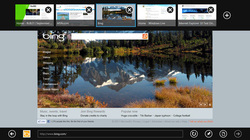
The new Internet Explorer 10 continues to improve the browsing experience for the user with better compliance to web standards resulting in a better browsing experience for the user. But again, they have changed the interface which means there will be an adjustment period (and it may be a substantial adjustment period). With the navigation bar now at the bottom of the screen and thumbnails of other sites at the top, this will take some getting used to. While the overall experience may be better in terms of the look and function of websites, the changes to the way you interact with Internet Explorer will mean a longer wait to appreciate them.  


With the new application panels, navigating through potentially pages of applications, the traditional mouse is going to mean slow browsing, especially compared to those with touch screens or who are used to using hotkeys (e.g. hitting the Windows button and D key to bring up your desktop). Once you are used to the hotkeys, they can be almost as fast as using a touch screen. But do not doubt for a moment that touch screens are the king of input methods. If you currently have a touch screen, Windows 8 will allow you to get more out of it. Having said that, it is by no means perfect and, especially using dual touch screen monitors, can require some setup time.

Picture
If you are planning a hardware upgrade or have done one recently (since June 2, 2012) you will be able to upgrade to Windows 8 Pro for just $14.99 on a Windows 7 system. If you are running Windows XP, Vista or 7, you can upgrade for $39.99. For a modern operating system, these prices are excellent (keep in mind, for non-profits, there may be even cheaper options through donation systems like TechSoup). For those still running Windows XP, consider going to 8 instead of 7 as you can keep your system files when you go to 8 which you can't do if you go to 7. 


Windows 8 may seem like overkill or may be difficult to appreciate why you would want to use it. With technology changing rapidly and more and more hardware going mobile, touch screen and prices dropping on hardware, Windows 8 is going to become the new standard. Even if you aren't planning a hardware upgrade for a few years, getting used to Windows 8 now at the entry level price will have you more comfortable with it by the time its use is prevalent. And that can keep you ahead of the game.
0 Comments

    Tell Us What You Want to See!
    Click here

    Author

    GreenIT TechTogether is a tech social enterprise that works with nonprofit technology and its use to do more good in the world.

    Archives

    August 2013
    March 2013
    January 2013
    November 2012
    October 2012
    September 2012
    November 2011

    Categories

    All

    RSS Feed

Powered by Create your own unique website with customizable templates.